Update Verizon.net account info in POP3 email applications

Update Verizon.net account info in POP3 email applications

Update Verizon.net account info in POP3 email applications

article type icon
Learn how to update your account info for 3rd party email clients.

Tip icon.These steps should be followed only if you've been using a 3rd party email client with POP3 enabled to send and receive Verizon.net email prior to migrating to AOL. If you're not currently using an email client with POP3 enabled, you can set up your Verizon.net AOL Mail account using IMAP.

POP3 lets you access your emails in a 3rd party application. Your messages are downloaded to a single computer or device from a server, then deleted from the server. This means the only copy of your emails are on that specific device.

After migrating your Verizon.net email to AOL Mail, follow the steps below to update your settings based on your email client. Be aware some sections will link to the client's help page, and they can't answer questions about AOL Mail settings, or your Verizon.net username or password.

No matter what application or software you use, the POP sever and port settings will be the same. Just make sure SSL is enabled and you use your full email address, including @verizon.net.

Server SettingsPort Settings
 Incoming mail server (POP3): pop.verizon.net
 
Outgoing mail server (SMTP): smtp.verizon.net
 POP3-995-SSL
 SMTP-465-SSL


Update email settings in Outlook 2016, 2013, or 2010

Update email settings in iOS Mail
  1. From your home screen, tap the Settings icon User-added image.
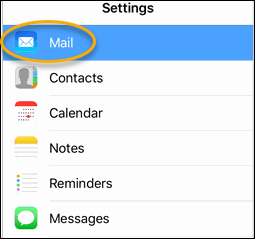
  2. Tap on the Mailmenu.

    User-added image

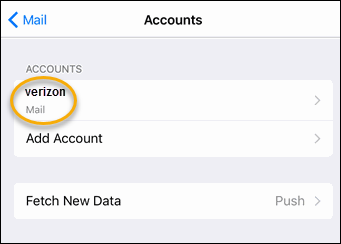
  3. Tap on your Verizon account.

    User-added image

  4. Type in your new password in the Password field and then tap on smtp.verizon.net in the lower-right corner of the screen.

    User-added image

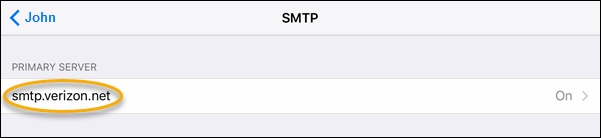
  5. A new menu opens. Tap on smtp.verizon.net.

    User-added image

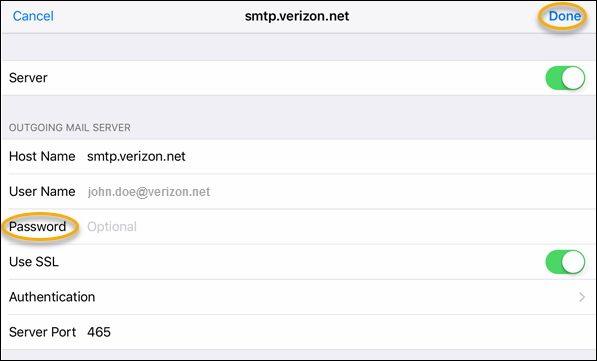
  6. Type in your new password in the Password field and then tap Done in the upper-left corner.

    User-added image

  7. Return to your home screen.
  8. Send a test email to yourself to ensure the settings are correct and your email arrives successfully.

Update email setting in Android Mail

  1. Tap on the Settings button on your home screen.
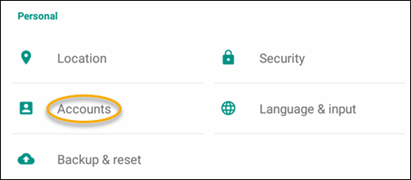
  2. Scroll down and tap Accounts.

    User-added image

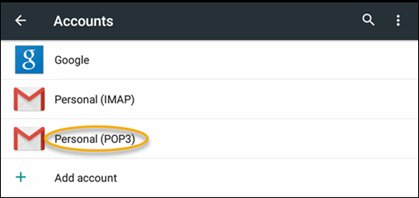
  3. Tap Personal (POP3).

    User-added image

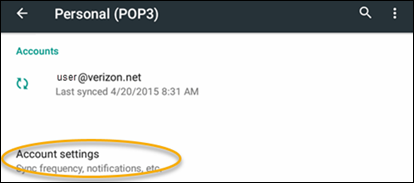
  4. Tap Account Settings.

    User-added image

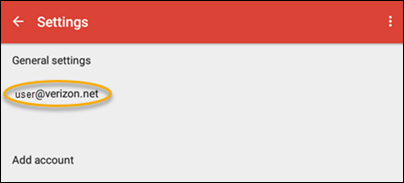
  5. Tap on your Verizon account.

    User-added image

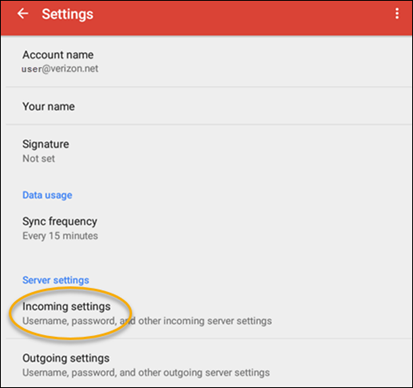
  6. Scroll down to Incoming settings and tap on it.

    User-added image

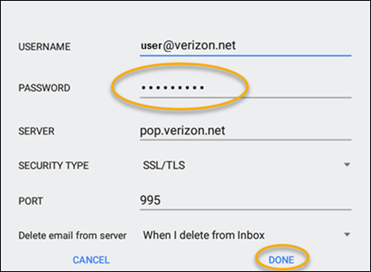
  7. Type your new password in the Password field and then tapDone.

    User-added image

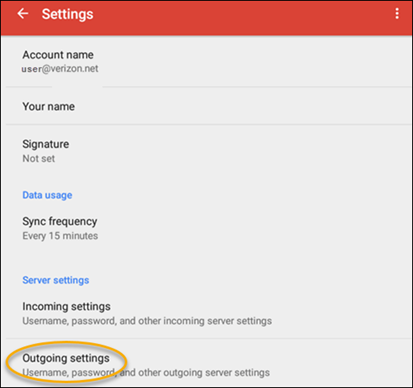
  8. Tap on Outgoing settings.

    User-added image

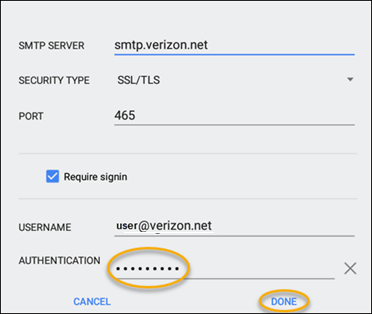
  9. Type in your new password in the Authentication field and tap Done when complete.

    User-added image

  10. Return to your home screen.
  11. Send a test email to yourself to ensure the settings are correct and your email arrives successfully.
    • Related Articles

    • Configure a Verizon.net account using IMAP

      Configure a Verizon.net account using IMAP Learn how to set up your Verizon migrated account in third party email applications using the IMAP protocol. This article should be followed only if you haven't used POP3 with a 3rd party mail client. If ...
    • AOL Mail for Verizon Customers

      https://help.aol.com/products/aol-mail-verizon AOL Mail for Verizon Customers AOL Mail welcomes Verizon customers to our safe and delightful email experience! Check your MailTry the AOL app
    • AOL Help

      https://help.aol.com/ Recommended For You AOL Mail AOL Mail provides a safe and delightful email experience for millions of people around the world.Get Help System Mechanic Restore power, speed and stability with over 200 critical tests and 50 tools ...
    • Ways to securely access AOL Mail

      https://help.aol.com/articles/allow-apps-that-use-less-secure-sign-in Ways to securely access AOL Mail Maintain security while you access your account. Find out the best ways to use AOL Mail to keep your email secure and private. By default, we block ...
    • AOL Reset or change your password

      Reset or change your password Your password gives you access to every AOL service you use. Learn how to reset your password if you forget it, and how to change your password. Your password gives you access to every AOL service you use. If you've ...